1. Token Bucket
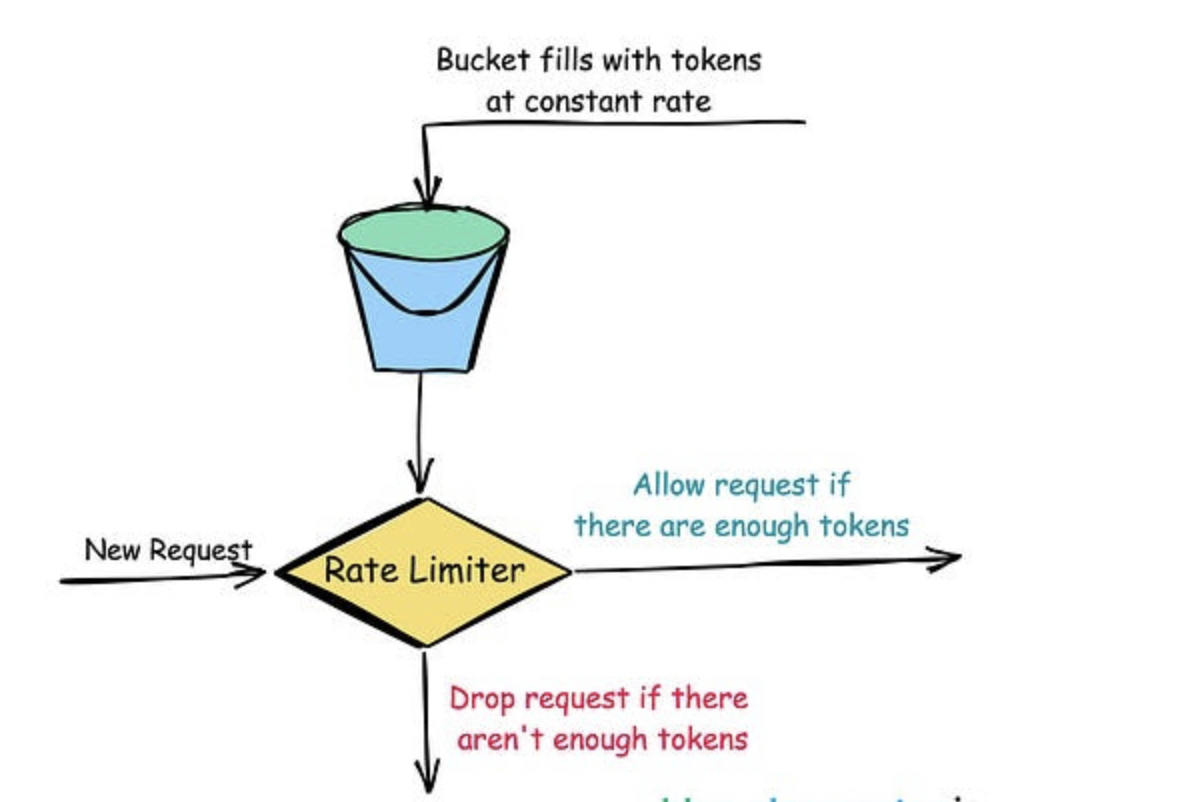
    private final long capacity;        // Maximum number of tokens the bucket can hold
    private final double fillRate;      // Rate at which tokens are added to the bucket (tokens per second)
    private double tokens;              // Current number of tokens in the bucket
    private Instant lastRefillTimestamp; // Last time we refilled the bucket

    public TokenBucket(long capacity, double fillRate) {
        this.capacity = capacity;
        this.fillRate = fillRate;
        this.tokens = capacity;  // Start with a full bucket
        this.lastRefillTimestamp = Instant.now();
    }

    public synchronized boolean allowRequest(int tokens) {
        refill();  // First, add any new tokens based on elapsed time

        if (this.tokens < tokens) {
            return false;  // Not enough tokens, deny the request
        }

        this.tokens -= tokens;  // Consume the tokens
        return true;  // Allow the request
    }

    private void refill() {
        Instant now = Instant.now();
        // Calculate how many tokens to add based on the time elapsed
        double tokensToAdd = (now.toEpochMilli() - lastRefillTimestamp.toEpochMilli()) * fillRate / 1000.0;
        this.tokens = Math.min(capacity, this.tokens + tokensToAdd);  // Add tokens, but don't exceed capacity
        this.lastRefillTimestamp = now;
    }
}
2. Leaky Bucket
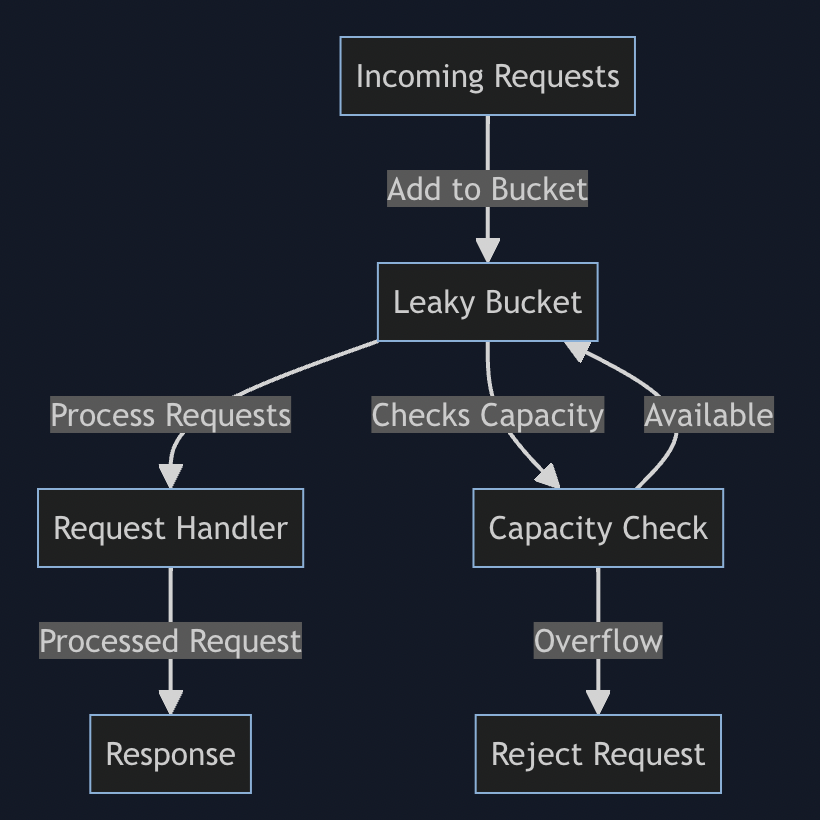
_Example Scenario
- Bucket Capacity: 10 requests
- Leak Rate: 2 requests per second
- If requests come in at a rate of 5 requests per second, the bucket fills up, but it will still allow 2 requests per second to leak out and be processed.
- In the case of a sudden spike where 20 requests come in at once, the first 10 will fill the bucket, but only 2 will be processed per second. The remaining requests will be rejected until space is available in the bucket.
import java.util.concurrent.locks.ReentrantLock;

public class LeakyBucket {
    private final int capacity;
    private final int leakRate; // requests per second
    private int currentVolume;
    private long lastLeakTime;
    private final ReentrantLock lock = new ReentrantLock();

    public LeakyBucket(int capacity, int leakRate) {
        this.capacity = capacity;
        this.leakRate = leakRate;
        this.currentVolume = 0;
        this.lastLeakTime = System.currentTimeMillis();
    }
        public boolean addRequest() {
        long currentTime = System.currentTimeMillis();
        leak(currentTime);

        lock.lock();
        try {
            if (currentVolume < capacity) {
                currentVolume++;
                return true; // Request accepted
            } else {
                return false; // Bucket is full, request rejected
            }
        } finally {
            lock.unlock();
        }
    }

    private void leak(long currentTime) {
        long timeElapsed = currentTime - lastLeakTime;
        int leaks = (int) (timeElapsed / 1000) * leakRate;
        currentVolume = Math.max(0, currentVolume - leaks); // Prevents underflow
        lastLeakTime = currentTime;
    }

}- Controlled processing rate
- Burst handling: It permits bursts of incoming requests up to the bucket’s capacity. If a sudden influx of requests occurs, the system can temporarily accept them, which can enhance user experience by reducing rejections in high-traffic scenarios
- Consistency in service: - The constant processing rate helps maintain a consistent user experience by preventing spikes in response times that can occur with other rate limiting techniques, like fixed windows or token buckets.
3. Fixed Window Counter
Example scenario
- Time Window: 1 minute
- Request Limit: 100 requests per minute
- If a user makes 100 requests within a minute and then tries to make an additional request in the same minute, that request will be rejected until the next minute starts, at which point the counter resets. _Disadvantages:
- If a user makes 100 requests just before a window ends (e.g., at 59 seconds), they can overwhelm the server, resulting in a sudden load increase when the rate limiter resets.
-
- Consider a user sending 1 request per second in a 1-minute window with a limit of 60 requests. They might hit the limit if they sent the 60th request exactly when the window resets, disrupting their experience.
-
- The window size must be large enough to accommodate most typical usage patterns, yet small enough to respond quickly to usage spikes.
- potential for throtlling : - A user may submit two requests(101, 102) 59 seconds into the current window, which will get rejected. If they then attempt the same just a second after the window resets, request will be success full, this will create dissatisfaction in user expericence.’
_There are 2 places to add Rate limiter implementation:
- create separate API rate limiter service and deploy a full fledges rate limiter distributed service along with load balancer.
- Make rate limiter a library not a service, and use redis to update counter from service it self instead of calling.
Sliding Window
If the number of requests served on configuration key key(ip/userid) in the last time_window_sec seconds is more than number_of_requests configured for it then discard, else the request goes through while we update the counter.
`For example, if we have a one-minute time window, the algorithm tracks requests made in the last 60 seconds, rather than resetting every minute.
The Rate limiter has the following components
- Configuration Store To keep all the rate limit configurations. Ex: last 1 min 100 request aloowed. The primary role of the Configuration Store would be to efficiently store configuration for a key and efficiently retrieve the configuration for a key
there would be billions of entries in this Configuration Store, using a SQL DB to hold these entries will lead to a performance bottleneck and hence we go with a simple key-value NoSQL database like MongoDB or DynamoDB for this use case. Getting the rate limit configuration is a simple get on the Configuration Store by key. Since the information does not change often and making a disk read every time is expensive, we cache the results in memory for faster access.
EX:
Config store data
{
 "user:241531": {
   "time_window_sec": 1,
   "capacity": 5
 }
}
user with id `241531` would be allowed to make `5` requests in `1` second.
**Request Store ** - to keep all the requests made against one configuration key, redis can be used for this purpose. Request Store will hold the count of requests served against each key per unit time. The most frequent operations on this store will be
- registering (storing and updating) requests count served against each key - write heavy
- summing all the requests served in a given time window - read and compute heavy
- cleaning up the obsolete requests count - write heavy
Since the operations are both read and write-heavy and will be made very frequently (on every request call), we chose an in-memory store for persisting it. A good choice for such operation will be a datastore like Redis but since we would be diving deep with the core implementation, we would store everything using the common data structures available.
Request store data
{
	"user:241531//config key" :{
		"epocTime": "number of request served on that sec",
		1223435346: 24 // define atomic integer,
		2345465465: 34
	}
}
_Decision Engine_ - it uses data from the Configuration Store and Request Store and makes the decision
boolean isAllowed(long currentTime){
	# the configuration holds the number of requests allowed in a time window.
    config = getRateLimitConfig(key)

    start_time = current_time - config.time_window_sec
    // The window returned, holds the number of requests served since the start_time
    int  number_of_requests = getCurrentWindowCount(key, start_time)

    if number_of_requests > config.capacity:
        return False

    # Since the request goes through, register it.
    registerRequest(key, current_time)
    return True
}

Config getRateLimitConfig(key){
	value = cache.getValue(key);
	if(value == null){
		value = dbstore.get(key);
		cache.put(key, value);
	}
	return value;
}

int getCurrentWindowCount(key, startTime){
	requestData = requestStore.get(key);
	int totalRequest;
	if(null == requestData)
		return 0;

	foreach(entry: requestData){
		if(entry.getKey() < startTime)
			totalRequest+=entry.getValue();
		else
			requestData.remove(entry.getKey());
	}

	return totalRequest;
}


void registerRequest(key, time){ // update time counter atomically
	storeEntry = requestStore.get(key);
	int count = storeEntry.get(time)+1;
	storeEntry.add(time, count);
}
`Things to take care in multithreaded highly concurrent systems:
- registerRequest increment count, it has to be make atomic or implement lock while increment values.
- Since we are deleting the keys from the inner dictionary that refers to older timestamps (older than the
start_time), it is possible that a request with olderstart_timeis executing while a request with newerstart_timedeleted the entry and lead to incorrecttotal_requestcalculation. To remedy this we could either
- delete entries from the inner dictionary with a buffer (say older than 10 seconds before the start_time),
- take locks while reading and block the deletions
-
- use a data structure that is optimized for range sum, like segment tree
-
- use a running aggregation algorithm that would prevent from recomputing redundant sums
- Since the Request Store is doing all the heavy lifting and storing a lot of data in memory, this would not scale if kept on a single instance. We would need to horizontally scale this system and for that, we shard the store using configuration key key and use consistent hashing to find the machine that holds the data for the key.
- The number of configurations would be high but it would be relatively simple to scale since we are using a NoSQL solution, sharding on configuration key
keywould help us achieve horizontal scalability.