_It is a fully-managed, highly scalable, key-value service provided by AWS. It can be majorly used for caching usecases.
_**DynamoDB for almost any persistence layer needs. It’s highly scalable, durable, supports transactions, and offers sub-millisecond latencies. Additional features like DAX for caching and DynamoDB Streams for cross-store consistency make it even more powerful. So if your interviewer allows, its probably a great option.
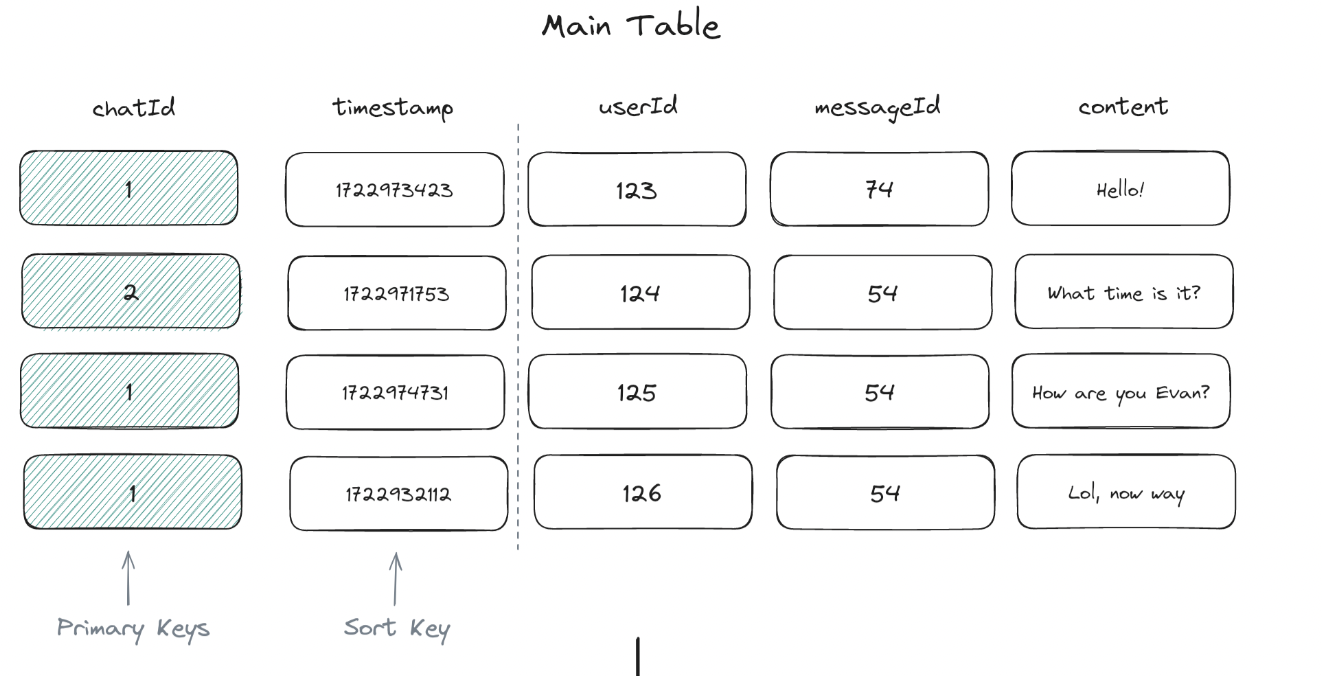
DynamoDB tables are defined by a primary key, which can consist of one or two attributes: primary key = {*Partition Key}:{Sort Key}
Partition Key: A single attribute that, along with the sort key (if present), uniquely identifies each item in the table. SortKey: The sort key is used to order items with the same partition key value, enabling efficient range queries and sorting within a partition. Example: Group chat application, it would make sense to use the chat_id as the partition key and message_id as the sort key.
_**Suitable for high read and write: ex: leader board, IOT data, product catalogue, shopping cart, session data
*#Storage Model DynamoDB uses B tree to achieve speed. `it opts for an approach that favors read speed over write speed. Its a masterless peer to peer communication cluster
B-trees for Sort Keys: Within each partition, DynamoDB organizes items in a B-tree data structure indexed by the sort key. This enables efficient range queries and sorted retrieval of data within a partition.
Composite Key Operations: When querying with both keys, DynamoDB first uses the partition key’s hash to find the right node, then uses the sort key to traverse the B-tree and find the specific items. This two-tier approach allows DynamoDB to achieve both horizontal scalability (through partitioning) and efficient querying within partitions (through B-tree indexing). It’s this combination that enables DynamoDB to handle massive amounts of data while still providing fast, predictable performance for queries using both partition and sort keys.
Secondary Indexes
But what if you need to query your data by an attribute that isn’t the partition key? Global Secondary Index (GSI
- An index with a partition key and optional sort key that differs from the table’s partition key. GSIs allow you to query items based on attributes other than the table’s partition key.
- Since GSIs use a different partition key, the data is stored on entirely different physical partitions from the base table and is replicated separately.
- When an item is added, updated, or deleted in the main table, DynamoDB asynchronously updates the GSI.
- This allows for greater query flexibility but requires additional storage and processing overhead.
Example uses, if you have a chat table with messages for your chat application, then your main table’s partition key would likely be chat_id with a sort key on message_id. This way, you can easily get all messages for a given chat sorted by time. But what if you want to show users all the messages they’ve sent across all chats? Now you’d need a GSI with a partition key of user_id and a sort key of message_id.
Local Secondary Index (LSI) 1. An index with the same partition key as the table’s primary key but a different sort key. 2. LSIs enable range queries and sorting within a partition. Since LSIs use the same partition key as the base table, they are stored on the same physical partitions as the items they’re indexing. 3. LSI maintain a separate B-tree structure within each partition, indexed on the LSI’s sort key. 4. Updates to LSIs are done synchronously with the main table updates, ensuring strong consistency. Example uses: we already can sort by message_id within a chat group, but what if we want to query messages with the most attachments within a chat group? We could create an LSI on the num_attachments attribute to facilitate those queries and quickly find messages with many attachments.
There are two primary ways to access data in DynamoDB: `Scan and Query operations.
Scan Operation - Reads every item in a table or index and returns the results in a paginated response. Scans are useful when you need to read all items in a table or index.
they are inefficient for large datasets due to the need to read every item and should be avoided if possible.
Ex:
SELECT * FROM users
const params = {
	TableName: 'users'
};
dynamodb.scan(params, (err, data) => {
			if (err) console.error(err);
			 else console.log(data);
		 }
	 );
Query Operation: Retrieves items based on the primary key or secondary index key attributes. Queries are more efficient than scans, as they only read items that match the specified key conditions. Queries can also be used to perform range queries on the sort key.
`SELECT * FROM users WHERE user_id = 101`

const params = {
	TableName: 'users',
	KeyConditionExpression: 'user_id = :id',
	ExpressionAttributeValues: { ':id': 101 } };
	 dynamodb.query(params, (err, data) => {
		  if (err) console.error(err);
		   else console.log(data);
		   }
	);
Knowing its limitations
Cost Efficiency: DynamoDB’s pricing model is based on read and write operations plus stored data, which can get expensive with high-volume workloads.
Complex Query Patterns: If your system requires complex queries, such as those needing joins or multi-table transactions, DynamoDB might not cut it.
Data Modeling Constraints: DynamoDB demands careful data modeling to perform well, optimized for key-value and document structures. If you find yourself frequently using Global Secondary Indexes (GSIs) and Local Secondary Indexes (LSIs), a relational database like PostgreSQL might be a better fit.
Vendor Lock-in: Choosing DynamoDB means locking into AWS.
Example cost: 2M writes a second of ~100 bytes would cost you about 100k a day.
Security
Data is encrypted at rest by default in DynamoDB, so your data is secure even when it’s not being accessed. You can also enable encryption in transit to ensure that data is encrypted as it moves between DynamoDB and your application.
DynamoDB integrates with AWS Identity and Access Management (IAM) to provide fine-grained access control over your data.
Dynamo DB Accelerator
Fun fact, Dynamo comes with a built-in, in-memory cache called DynamoDB Accelerator (DAX). So there may be no need to introduce additional services (Redis, MemchacheD) into your architecture, just enable DAX. DAX requires no changes to application code; it simply needs to be enabled on your tables. It operates as both a read-through and write-through cache, which means it automatically caches read results from DynamoDB tables and delivers them directly to applications, as well as writes data to both the cache and the underlying DynamoDB table. Cached items are invalidated when the corresponding data in the table is updated or when the cache reaches its size limit.
Streams
Dynamo also has built-in support for Change Data Capture (CDC) Streams capture changes to items in a table and make them available for processing in real-time. Any change event in a table, such as an insert, update, or delete operation, is recorded in the stream as a stream record to be consumed by downstream applications.
Uses:
- DynamoDB Streams can be used to keep an Elasticsearch index in sync with a DynamoDB table. This is useful for building search functionality on top of DynamoDB data.
- By processing DynamoDB Streams with Kinesis Data Firehose, you can load data into Amazon S3, Redshift, or Elasticsearch for real-time analytics.
- You can use DynamoDB Streams to trigger Lambda functions in response to changes in the database. This can be useful for sending notifications, updating caches, or performing other actions in response to data changes.
Uses to keep session data
DynamoDb because AWS is in caused in Demand-base. Autoscaling was Built in TTL Performance for Session data detail: